When setting up a WordPress website, it is easy to focus on the look and feel of the website, while overlooking the important aspect of security. This makes sense, because the security of a website is largely invisible until something goes wrong. Installing a cybersecurity plugin like Wordfence significantly reduces the chances of a successful attack on a WordPress site.
What no software can fully protect is the human element. This is where cybersecurity models and frameworks come in. Cybersecurity frameworks are a common tool used by organizations to protect their networks, systems, and digital assets. One well-known framework is the National Institute of Standards and Technology (NIST) Framework Core, which consists of Five Functions. While the NIST Framework Core is often associated with securing government networks, the same principles apply to WordPress websites as well.
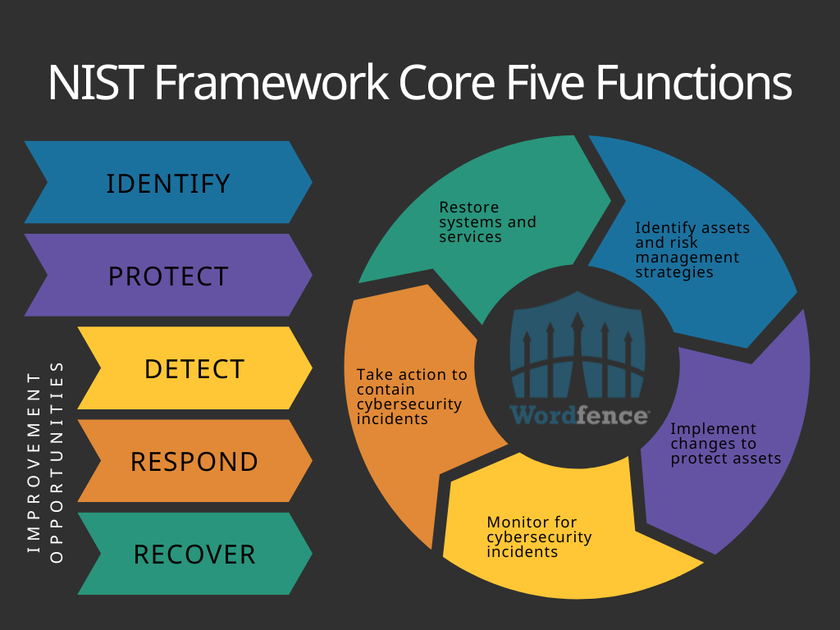
The Five Functions in the NIST Cybersecurity Framework Core are identified as the Identify, Protect, Detect, Respond, and Recover phases. Each phase describes an important aspect of securing an organization’s physical and digital assets.
Identify
The Identify function helps to identify any assets that need some form of cybersecurity protection. This includes physical assets like servers, digital assets like software, and even people.
WordPress websites have many parts, both physical and digital. Even if a site is not hosted on a server that is physically controlled by the site owner, the server itself must still be a consideration of the site owner. Choosing a host that is trusted and has a record of using proven cybersecurity practices helps to ensure that the chances of a compromise of the server itself is minimized.
In addition to physical assets, all software used needs to be accounted for as well. On a WordPress site, this means WordPress core, themes, and plugins (whenever possible, best practice may be to enable automatic updates). Any underlying technologies may also need to be cataloged. If not managed by the host, then the site owner will also need to ensure that appropriate updates processes and cybersecurity considerations are taken into account for the web server software (Apache, Nginx, etc.).
Protect
The Protect function guides the implementation of resources that will reduce the impact of a cybersecurity incident and prevent it from spreading. Physical security will be implemented in this phase as possible, and any site administrator will be implementing digital security solutions, such as Wordfence Premium, to protect against existing and new threats to the website.
Along with any physical and digital security measures, it is also important to keep in mind the people behind the website. Anyone who assists in managing the website will need to be considered an asset, and a potential cybersecurity risk. This means implementing access controls like user roles and two-factor authentication (2FA), utilizing the principle of least privilege by limiting access to roles, and training anyone who helps in the management of the website on cybersecurity best practices.
Detect
The Detect function outlines and implements methods, systems, and software that help to identify a cybersecurity incident rather than allowing it to continue unseen. It is important to run regular scans for malware on your website. Wordfence includes one of the industry’s largest WordPress-specific malware databases to scan websites and alert administrators of any malware found in their website files.
Monitoring website traffic can also help to detect threats. Wordfence Live Traffic monitors and tracks all activity on the website, logging the IP address, location, time, browser, and page being visited by any human or bot accessing the website. After reviewing traffic, the administrator has the option to dive deeper into the details of a specific visitor or even block the IP to prevent its access in the future.
Respond
When a cybersecurity incident has been detected, the Respond function supports organizations in determining the appropriate actions needed to contain the incident. Responding to an incident may be something that can be handled by the website administrator, or they may need help from a team of cybersecurity experts. For more complex infections, or if the administrator is not familiar with how to respond to a malware threat, Wordfence team of analysts can use the scan data as a starting point to investigate and respond to malware that has been found on websites protected by Wordfence Care or Wordfence Response.
Recover
The final phase is the Recover function, which guides the recovery process after a cybersecurity incident, reducing the time required to return to normal operations. Cybersecurity incidents can modify the content or functionality of a website, requiring content to be restored from backup, themes or plugins to be reinstalled, or even running updates or installing new software to protect against the vulnerability that was exploited. Maintaining an awareness of available updates helps to ensure vulnerabilities are patched as quickly as possible, which is why Wordfence lists any available updates right on the Wordfence Scan Results page.
Conclusion
In this article we discussed how to apply the NIST Cybersecurity Framework Core to the protection of WordPress websites. Implementing the use of the NIST Cybersecurity Framework Core will help any website administrator to ensure that their website is secure, and that policies and procedures are in place to keep the website secure as software changes or vulnerabilities are discovered. When a cybersecurity incident occurs, they will be able to use the framework to help recover from the incident as quickly as possible to minimize the impact of the incident.